What VocalRig is
VocalRig is an all-in-one vocal chain plugin. It puts real-time pitch correction and a complete mixing chain in one insert, sets itself up from your voice with one Analyze click, and leaves you six macro knobs to shape the result. VST3 and AU for Mac and Windows, €35 (list price €59), one-time.
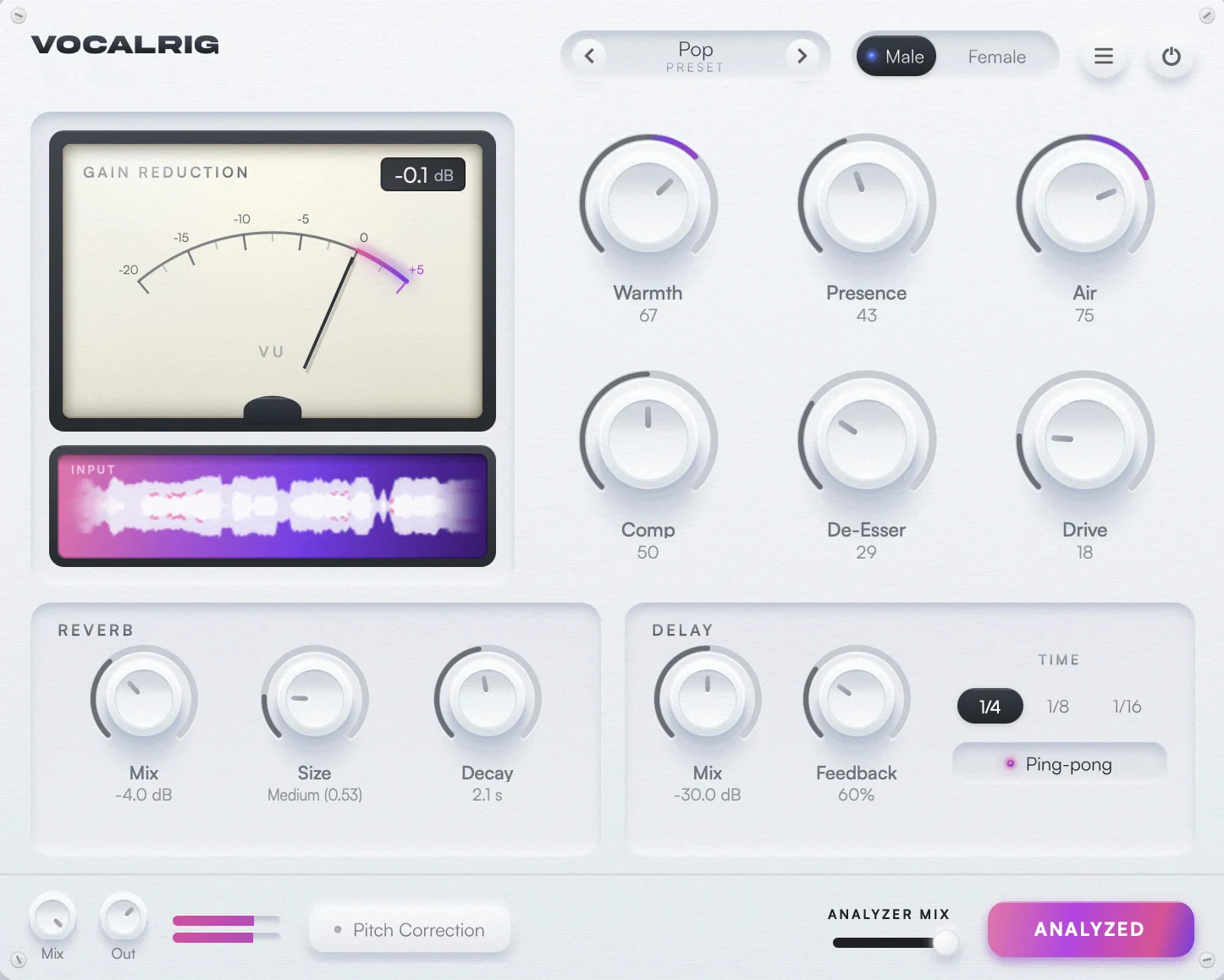
The idea is simple: a lead vocal goes through the same dozen processing stages in almost every professional mix, in roughly the same order. VocalRig wires those stages together the way a mix engineer would, gain-staged and in the right order, so you don’t have to load, order and balance a dozen plugins yourself.
Disclosure, since we’re a very serious company: we sell VocalRig on this site. Read this as the manual with jokes, not a review. It describes what the plugin does, and where it can’t do something, it says so.
At a glance
The facts in one place.
- TYPE
- All-in-one vocal chain with built-in pitch correction
- FORMATS
- VST3, AU and a standalone app
- PLATFORMS
- macOS 11 or later (Apple Silicon and Intel), Windows 10 or later
- DAWS
- Ableton Live, Logic Pro, FL Studio, Cubase, Studio One, Reaper, GarageBand and other VST3/AU hosts. Not Pro Tools (no AAX).
- TRACKS
- Stereo tracks only
- LATENCY
- About 1.5 ms, reported to and compensated by your DAW
- PROCESSING
- Colour stages 4x oversampled, sample-rate independent
- PRESETS
- 62 factory presets in nine groups; save, import and export your own
- LICENCE
- One computer at a time, movable; serial activated inside the plugin
- PRICE
- €35 (list price €59), one-time. Black Friday, ends November 29. Free updates.
The chain inside, in order
VocalRig runs its stages in the order a vocal is usually mixed: level, tuning, cleanup, colour, dynamics, polish, then space on parallel sends.
- 1Auto-LevelSlow gain rides ahead of everything; Analyze switches it on only for a dynamic take
- 2Pitch correctionReal-time tuning on the clean signal; off until you arm it
- 3Cleanup EQLow cut, placed by the Male/Female switch
- 4Channel stripInput colour, gain and tone shaping
- 5Passive tube EQLow-end weight and a smooth top
- 6Opto compressorSlow, program-dependent levelling
- 7FET compressorFast peak control and attitude
- 8Air bandPresence and sheen up top
- 9Multiband glueDensity across the bands; fixed
- 10Auto EQThe narrow dynamic cuts Analyze writes for your voice
- 11De-esserCatches sibilance where yours actually sits
- 12Finishing EQFinal tonal balance
- 13DoublerOptional stereo doubling, 2 or 4 voices
- 14Reverb and delayParallel sends off the finished vocal
The tuner sits ahead of every colour stage, so it reads your clean voice rather than a compressed, saturated one. The compressors come as a pair, slow opto levelling and fast FET peak control, so neither has to work hard. Reverb and delay are sends off the finished vocal rather than inline stages, which keeps the dry vocal in front and is what lets Tracking Mode mute them without touching anything else. For why this order matters, see our guide to vocal chain order.
What Analyze does
Press Analyze, play a few seconds of your vocal, and VocalRig sets up the whole chain for that voice. It’s a starting point, not a verdict: every knob stays yours.
- Detects your voice. It uses a trained model plus your vocal-tract formants, not just the pitch, so a high male hook isn’t treated as a female lead.
- Sets your levels. It gain-stages the input onto the chain’s sweet spot, so the compressors and saturation work where they should.
- Dials the six macros to match the tone and dynamics of your take.
- Finds your S sounds and locks the de-esser onto where your sibilance actually sits, instead of a fixed guess.
- Writes a corrective EQ: up to five narrow dynamic cuts and one broad fill, aimed at the resonances in your own voice. A clean voice gets fewer.
- Rides your level with a slow Auto-Level ahead of the compressors, but only if the performance is dynamic enough to need it.
The Analyzer Mix slider blends between your own settings and Analyze’s recommendation. One tip: analyze a representative part of the song, like a verse or chorus, rather than a whispered intro.
The six macros
Six knobs, each moving several settings underneath by the right amount. At 50 a macro is neutral; it trims on top of the preset, so your preset and any detailed tweaks stay intact.
| MACRO | WHAT IT MOVES |
|---|---|
| Warmth | Channel strip drive, tube EQ low boost, FET grit and the finishing EQ’s low shelf |
| Presence | Upper mids in the air band and the finishing EQ’s presence bell |
| Air | Tube EQ high boost and the air band’s top-end sheen |
| Comp | The opto compressor’s parallel blend and how hard the FET is driven |
| De-Esser | The channel strip’s sibilance trim, the de-esser amount and a harsh-band cut |
| Drive | Input level into the whole chain, with loudness compensation at the output |
A Male/Female switch in the header shifts the low cut, presence and de-esser frequencies for the voice in front of it. If you want every individual parameter, the Advanced panel exposes them.
Pitch correction
VocalRig’s tuner is a real-time pitch corrector, first in the chain and off by default. One click arms it; then you choose how audible it is.
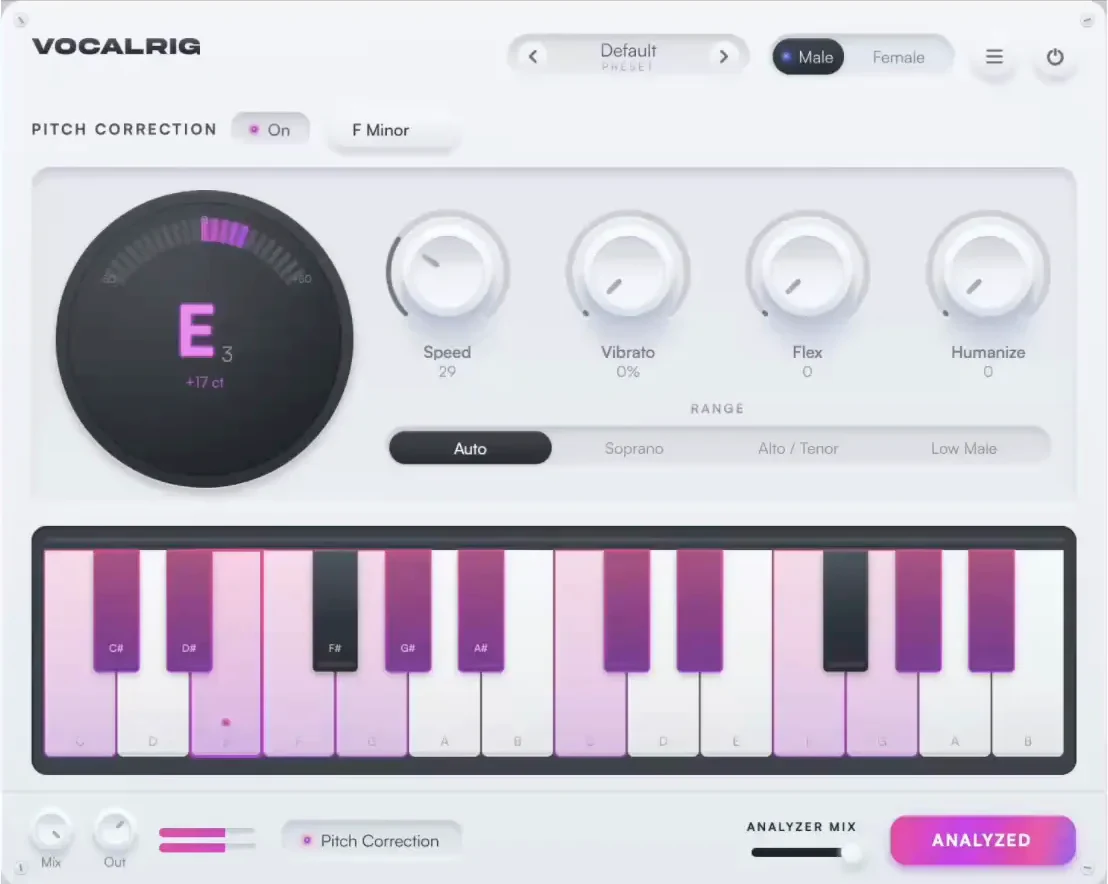
- Key and scale: major, minor, chromatic or the modes, or draw your own note set on the keyboard.
- Speed: 0 is instant correction, the hard, modern tuned sound. Higher values let notes glide into place, so it just tidies up.
- Flex: widens the space around each note so deliberate scoops, slides and bends survive.
- Vibrato and Humanize: keep, or add, life on long notes so they don’t go statue-still.
- Range: Auto, Soprano, Alto/Tenor or Low Male, telling the detector where your voice lives.
A tuner display shows the note you’re landing on and how many cents off it is. When the tuner is off or has nothing to correct, the audio passing through is your dry signal, just delayed by the reported latency. For note-by-note editing, use a dedicated editor first and leave VocalRig’s tuner off.
Reverb, delay and doubler
Space comes from two parallel sends: a reverb with Mix, Size and Decay, and a tempo-synced delay with Mix, Feedback, 1/4, 1/8 and 1/16 note values and ping-pong.
The doubler adds a stereo double of the finished vocal with two or four voices; the Doubled - Tight, Doubled - Wide and Chorus Vocal presets show it off, and it feeds the reverb and delay along with the lead. There’s also an FX Only preset that skips the whole processing strip and runs only the reverb and delay, with zero latency, for when you want VocalRig’s space after other processing.
Presets
62 factory presets, grouped into Basics, Pop, Hip-Hop & RnB, Afro & Latin, Band & Live, Electronic, Voice & Character, Doubler & Chorus and Effect.
Genre starting points run from Pop, Hip-Hop and Drill / Trap to Afrobeats, Amapiano, Latin / Reggaeton, Gospel / Worship, K-Pop, House / Dance Vocal and UK Drill / Grime. Character presets include Ballad / Soft, Bright & Airy, Deep Male and Vintage / Warm, and the effect group has Hyperpop / Hard Tune, Telephone / Lo-Fi, Megaphone, Stadium Echo and Ad-Lib / Throw. Signature chains by mix engineers Jordan Schultz, Joel Woolf and Alex Vasi sit in their genre groups. Save your own, or export and import them as .vrpreset files to swap with collaborators.
Latency and Tracking Mode
VocalRig reports about 1.5 ms of latency, which your DAW compensates automatically, so singing through it feels immediate.
Almost all of that latency comes from the pitch corrector; the reverb, delay, de-esser and EQs add none. Tracking Mode, in the plugin menu, mutes the reverb and delay while you record. That is both what you want to hear while tracking and where the CPU goes: at 48 kHz those two sends are about 42% of the plugin’s load. It doesn’t lower the latency. The oversampling adapts to your session’s sample rate, so higher rates don’t multiply the CPU cost.
Install, activate, first session
Install, enter your serial, insert it on a stereo vocal track, press Analyze. That’s the whole onboarding.
- Install. On Mac, a DMG with a one-click installer for AU, VST3 and the standalone app, signed and notarized by Apple. On Windows, an installer for VST3 and the standalone app. It isn’t code-signed yet, so SmartScreen may warn once: click “More info”, then “Run anyway”.
- Activate. Your serial arrives by email after purchase. Enter it in the activation screen on first use. Without one, VocalRig passes your audio through dry. To move to another computer, deactivate the old one first.
- First session. Insert VocalRig on a stereo vocal track (most DAWs make new audio tracks stereo already). Press Analyze and play a verse or chorus. Then pick a preset or turn a macro, arm the tuner and set the key if you want tuning, and switch on Tracking Mode while recording.
Not showing up in your DAW? Most hosts cache their plugin list, so force a rescan; in Logic, quit and reopen so the Audio Unit validator runs again.
What VocalRig doesn’t do
The honest list, so nobody finds out the hard way.
- No Pro Tools. There’s no AAX version.
- Stereo tracks only. Put it on a stereo vocal channel, not a true mono track.
- No harmonies. It doubles, but it doesn’t generate harmony voices. RigFX, a separate plugin, does.
- A real-time tuner, not a note editor. Redrawing melodies and fixing timing is still a job for a dedicated editor.
- One computer at a time. The licence moves, but it doesn’t run on two machines at once.
- A newer name. Fewer tutorials and third-party presets exist for it than for plugins that have been around for a decade.
- Unsigned Windows installer, for now. SmartScreen will raise an eyebrow once.
Who it’s for
VocalRig is for people who record their own vocals and want them finished, not just processed: singer-songwriters, rappers, producers and home studios working in Ableton, Logic, FL Studio, Cubase or Studio One.
Skip it if you mix in Pro Tools, need harmonies generated inside the same plugin, or genuinely enjoy building a fifteen-plugin chain by hand. That last group has our respect, and our sympathy. To see how it compares with the alternatives, read our ranking of the best vocal chain plugins.
Frequently asked questions
What is VocalRig?
VocalRig is an all-in-one vocal chain plugin: real-time pitch correction plus a complete mixing chain (channel strip, passive tube EQ, opto and FET compressors, air band, multiband glue, de-esser, corrective Auto EQ and finishing EQ), with reverb and a tempo-synced delay on parallel sends. You set it up with one Analyze click and shape it with six macro knobs.
Does VocalRig have autotune?
Yes. It has a real-time pitch corrector with key and scale, Speed, Flex, Vibrato and Humanize controls. Speed at zero gives the hard tuned effect; higher settings just tidy up. The tuner runs first in the chain and is off until you switch it on.
Does VocalRig work in Pro Tools?
No. Pro Tools needs AAX, and VocalRig ships as VST3 and AU only. It works in Ableton Live, Logic Pro, FL Studio, Cubase, Studio One, Reaper, GarageBand and other hosts that load VST3 or AU, on macOS (Apple Silicon and Intel) and Windows.
Do I still need Melodyne with VocalRig?
For most vocals, no. A dedicated editor still wins for note-by-note work: redrawing a melody, fixing timing, hand-tuning harmonies. You can use both: edit in the note editor first, leave VocalRig’s tuner off, and let VocalRig run the rest of the chain.
Can I record through VocalRig?
Yes. It reports about 1.5 ms of latency, which your DAW compensates. Tracking Mode mutes the reverb and delay while you record; at 48 kHz those two sends are about 42% of the plugin’s CPU load. It doesn’t lower the latency, which comes from the pitch corrector.
How much does VocalRig cost?
€35 (list price €59), as a one-time purchase with free updates. Current offer: Black Friday, ends November 29. No subscription. The licence runs on one computer at a time and can be moved.
In one sentence
One plugin, the whole vocal chain in the right order, set up from your voice and steered with six knobs, for €35.